Apple Watch multisport → Strava, fixed
Your race uploaded to Strava as one activity. Trisect splits it into three.
Strava has no multisport activity type, so your Apple Watch swim-bike-run arrives as a single generic blob. Wrong pace, no splits, sometimes no GPS at all. Trisect reads the leg boundaries your Watch already recorded and uploads each one as its own Strava activity, data intact. Nothing guessed, nothing dragged on a desktop graph.
Free during the beta · Install now and it stays free · No subscription, no accountThree screens, then it's done
Real screenshots, real race: a 25-minute open-water swim, 55.8 miles on the bike, a half marathon off it. Every route and every number below came off an Apple Watch.
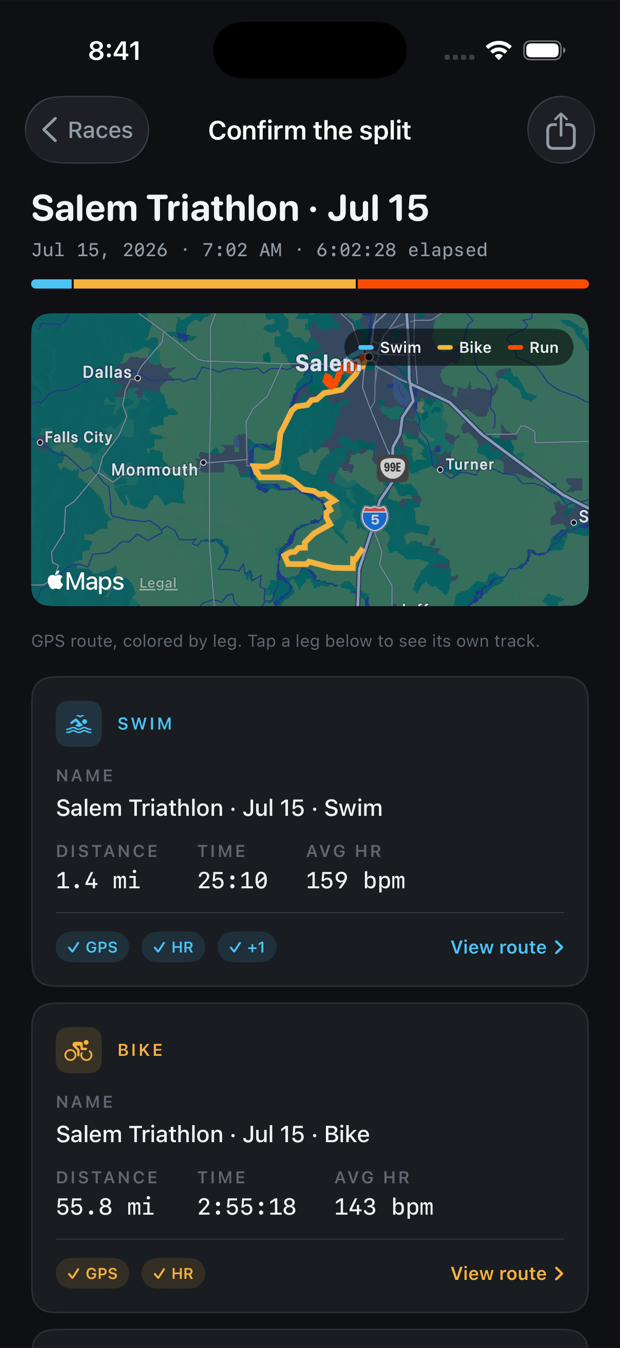
See the split before it happens
Your course, coloured by leg. The boundaries come from the Watch, so there is nothing to adjust. Rename the activities here if you want.
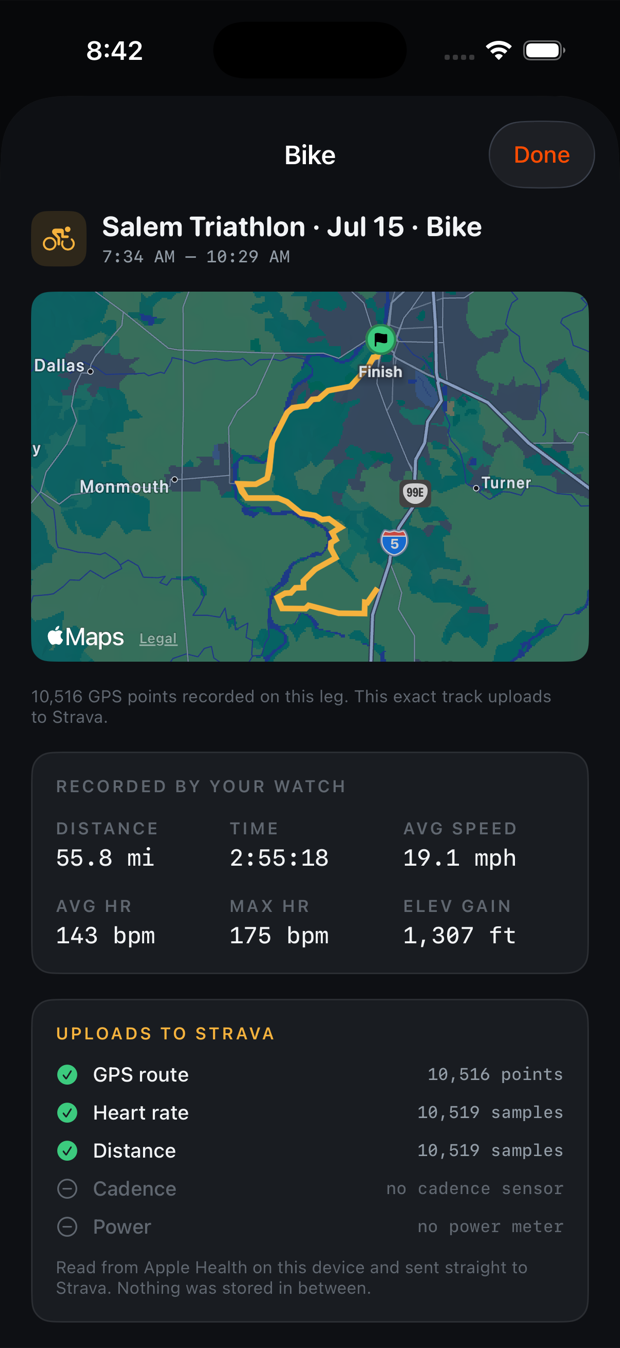
Count every stream first
Tap a leg to see its own track and exactly what will reach Strava — GPS points, heart-rate samples, cadence. Missing streams are shown too.
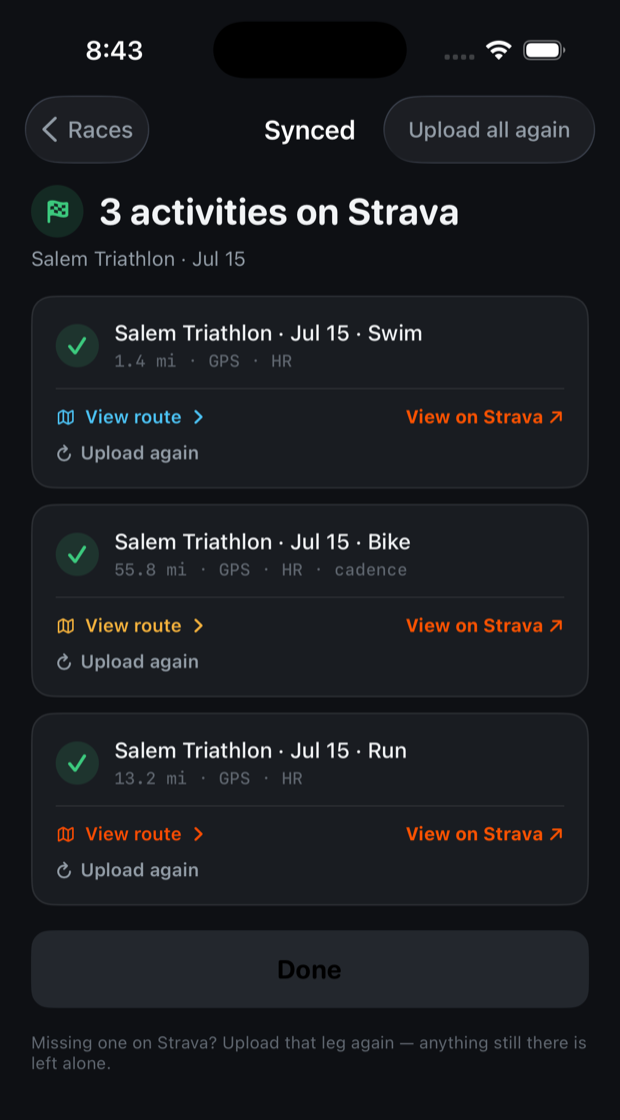
Three activities, correctly typed
Swim, bike and run land separately with the right sport and pace on each. Re-open the race later and it stays done — it cannot upload twice.
Sound familiar?
These are the exact reports athletes leave on Strava's own community forum. Strava staff have confirmed multi-sport activities aren't supported.
"After uploading to Strava it is shown as one continuous activity. You do not see any segments or average speed data for the individual sports."
Strava Community Hub · Devices & Connections
"My Apple Watch multi sport workout doesn't contain any GPS, distance and speed data when imported to Strava."
Strava Community Hub · reported by multiple athletes
"I recorded the triathlon race using Multisport. I want to publish the details on Strava, but I can't. No heart rate, GPS, acknowledgement of the different activities. It is stripped bare."
Strava Community Hub · race-day report
What actually reaches Strava
Not a promise — a count, shown per leg before you upload anything. This is a real bike leg.
Open-water swims keep their GPS track. Pool swims have none to lose, so they upload with distance, pace and heart rate, and you get a distance card instead of a map.
Every workaround, and where it breaks
You've probably tried some of these. Here's the honest comparison.
Strava's split tool
Only works on ride or run types, so you recategorise first, then drag markers on a graph to guess where T1 and T2 were, then fix each piece's type. Kudos and comments survive only on the first piece. And if the upload arrived with no GPS, there's nothing to split.
Export All Health Data
Export a zip from the Health app, dig through the workout-routes folder for GPX files named by UTC timestamp, upload each on the Strava website. It works. But GPX route files carry no heart rate, and you'll do this at a computer, per file, per race.
The TrainingPeaks detour
Sync Health to TrainingPeaks, download the FIT file, re-upload to Strava. When it works, it works. Athletes also report exported files coming back empty. A second platform account to fix a sync gap.
All-in-one sync suites
Capable apps, built for people who want a full analytics platform. They ask for wide Health access and run background sync year-round. If all you want is your race on Strava, it's a lot of app for one job.
Trisect
Your Watch already recorded the exact swim, bike and run boundaries. Trisect reads them, shows you the course on a map coloured by leg and a count of every data stream it found, then uploads three correctly typed activities. Transitions are noted in the descriptions if you want them, never dumped on your feed as junk activities. Duplicate uploads are blocked twice: locally, and by Strava itself.
How it works
One-time setup, then two taps per race.
Connect once
Read-only Apple Health access, and permission to upload to Strava. That's the entire setup. No account, no email, no password.
Pick your race
Trisect lists only your multisport workouts — search by name or filter by date if you have a season's worth. Tap one to confirm the split.
Upload
Swim, bike and run land on Strava as separate activities with correct types and paces. Safe to leave mid-upload; it resumes and never sends twice.
Free while we're in beta
And free permanently for everyone who shows up during it.
Right now
- All three legs, every race, full data
- No card, no trial clock, nothing to cancel
- Install during the beta and it stays free for you, even if Trisect starts charging later
Later, for new arrivals
- The run leg stays free for everyone, always
- A one-time unlock for swim and bike — never a subscription
- Priced like a tip, because you already pay for Strava
That promise is enforced by the app, not by us remembering: Trisect records the date you first opened it, on your own device, and treats you as a founding user from then on. Nothing about it is sent anywhere.
Your data doesn't stop here
Structural privacy, not a policy promise.
No database. Workout data goes from your phone straight to Strava. The only server involved holds the Strava sign-in secret and never receives workout data at all.
No location permission. Routes come from the workout your Watch already saved. Trisect never tracks you, and can't.
Upload-only Strava access. Trisect asks for permission to add activities, not to read the ones you already have.
FAQ
Why does my Apple Watch triathlon show up as one activity on Strava?
Strava has no multi-sport activity type. When Apple Health syncs a multisport workout, Strava imports it as a single generic Workout: no per-sport splits, no correct paces, no transitions. Strava staff have confirmed on their community forum that multi-sport activities aren't supported. Trisect reads the swim, bike and run legs your Watch already recorded and uploads each as its own correctly typed activity.
Can I just use Strava's split tool?
Partially. It only works on ride or run activities, so you change the type first, drag markers on a desktop graph to guess your transition points, then recategorise each piece. Kudos and comments survive only on the first piece. And some Apple multisport uploads arrive with no GPS or speed data at all, leaving nothing to split. Trisect uses the exact leg boundaries your Watch recorded. Nothing is guessed.
Does Trisect upload heart rate and GPS?
Yes. Each leg uploads with its GPS route, per-second heart rate, distance and running cadence. Bike cadence and power upload too if you ride with sensors paired to your Watch — an Apple Watch on its own can't measure either, and Trisect tells you so rather than quietly leaving them out. Before you upload, you see a count of every stream found on each leg.
What does it cost?
Nothing, during the beta — every leg of every race uploads free. If Trisect later charges for swim and bike, anyone who installed during the beta keeps them free permanently. The app records your arrival date on your own device and honours it; nothing is sent anywhere. No subscription, no trial clock, no card.
What permissions does it need?
Two. Read-only workout data in Apple Health, and permission to upload activities to Strava. Trisect requests Strava's activity:write scope only, so it cannot read or modify activities you already have. No location, no account, no notifications, no tracking.
Is my workout data stored anywhere?
No. Data goes phone to Strava, directly. Trisect has no database. The upload file is built in memory, sent under your own authorisation, and discarded. There's nothing to store, sell or breach.
Can it upload the same race twice by accident?
No. Trisect tracks what's synced, and every upload carries a unique identifier Strava uses to reject duplicates on their side too. Reinstall the app and try again: Strava still refuses.
Pool swims and bricks?
Both. Pool swim legs have no GPS to lose, so they upload with distance, pace and heart rate, and you get a distance card instead of a map. Bricks recorded in Multisport mode split into two activities the same way.
What happens to my transition times?
T1 and T2 never hit your feed as junk activities. Optionally, Trisect notes them in each activity's description so the record is complete.
What do I need to run it?
An iPhone on iOS 17 or later, an Apple Watch that records Multisport workouts (watchOS 9 or later), and a Strava account.
Splits your race the way your watch already did
Trisect is in private beta. Leave your email and we'll send a TestFlight invite.
One email when it's ready. Nothing else, ever.